> ## Documentation Index
> Fetch the complete documentation index at: https://vapi-bephrem-11labs-in-quickstart.mintlify.site/llms.txt
> Use this file to discover all available pages before exploring further.
# Introduction
> Vapi is the Voice AI platform for developers.
export const SdkCards = ({iconColor}) =>
Add a Vapi assistant to your web application.
Add a Vapi assistant to your iOS app.
Add a Vapi assistant to your Flutter app.
Add a Vapi assistant to your React Native app.
Multi-platform. Mac, Windows, and Linux.
;
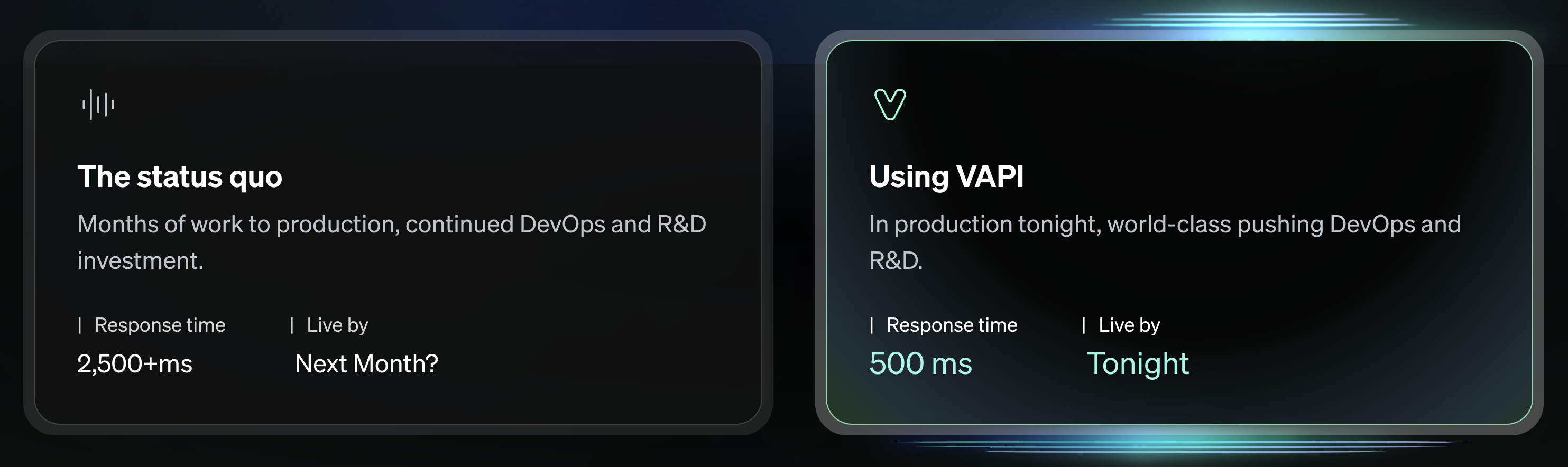 Vapi lets developers build, test, & deploy voice AI agents in minutes rather than months — solving for the foundational challenges voice AI applications face:
Turn-taking, interruption handling, backchanneling, and more.
Responsive conversation demands low latency. Internationally. (\<500-800ms voice-to-voice).
Taking actions during conversation, getting data to your services for custom actions.
Review conversation audio, transcripts, & metadata.
Implemented from scratch, this functionality can take months to build, and large, continuous,
resources to maintain & improve.
Vapi abstracts away these complexities, allowing developers to focus on the core of their voice AI application's business logic. **Shipping in days, not months.**
## Quickstart Guides
Get up & running in minutes with one of our [quickstart](/quickstart) guides:
The easiest way to start with Vapi. Run a voice agent in minutes.
## Common Workflows
Explore end-to-end examples for some common voice workflows:
We’ll build an outbound sales agent that can schedule appointments.
We’ll build an outbound sales agent that can schedule appointments.
## Key Concepts
Gain a deep understanding of key concepts in Vapi, as well as how Vapi works:
Learn what goes on behind-the-scenes to make Vapi work.
## Explore Our SDKs
Our SDKs are open source, and available on [our GitHub](https://github.com/VapiAI):
## FAQ
Common questions asked by other users:
If you are **a developer building a voice AI application simulating human conversation** (w/ LLMs — to whatever degree of application complexity) — Vapi is built for you.
Whether you are building for a completely "turn-based" use case (like appointment setting), all the way to robust agentic voice applications (like virtual assistants), Vapi is tooled to solve for your voice AI workflow.
Vapi runs on any platform: the web, mobile, or even embedded systems (given network access).
Not a problem, we can likely already support it. Vapi is designed to be modular at every level of the voice pipeline: Text-to-speech, LLM, Speech-to-text.
You can bring your own custom models for any part of the pipeline.
* **If they’re hosted with one of our providers:** you just need to add your [provider keys](/provider-keys), then specify the custom model in your API requests.
* **If they are hosted elsewhere:** you can use the `Custom LLM` provider and specify the [URL to your model](/custom-llm) in your API request.
Everything is interchangeable, mix & match to suit your usecase.
You could (and the person writing this right now did, from scratch) — but there are good reasons for not doing so.
Writing a great realtime voice AI application from scratch is a fairly challenging task (more on those challenges [here](/challenges-of-realtime-conversation)). Most of these challenges are not apparent until you face them, then you realize you are 3 weeks into a rabbit hole that may take months to properly solve out of.
Think of Vapi as hiring a software engineering team for this hard problem, while you focus on what uniquely generates value for your voice AI application.
***
But to address cost, the vast majority of cost in running your application will come from provider cost (Speect-to-text, LLM, Text-to-speech) direct with vendors (Deepgram, OpenAI, ElevenLabs, etc) — where we add no fee (vendor cost passes-through). These would have to be incurred anyway.
Vapi only charges its small fee on top of these for the continuous maintenance & improvement of these hardest components of your system (which would have costed you time to write/maintain).
No matter what, some cost is inescapable (in money, time, etc) to solve this challenging technical problem.
Our focus is solely on foundational Voice AI orchestration, & it’s what we put our full time and resources into.
To learn more about Vapi’s pricing, you can visit our [pricing page](/pricing).
No — in fact, the setup could not be easier:
* **Web Dashboard:** It can take minutes to get up & running with our [dashboard](https://dashboard.vapi.ai/).
* **Client SDKs:** You can start calls with 1 line of code with any of our [client SDKs](/clients).
For more advanced features like function calling, you will have to set up a [Server URL](/server_url) to receive and respond to messages.
Vapi focuses on developers. Giving developers modular, simple, & robust tooling to build any voice AI application imaginable.
Vapi also has some of the lowest latency & (equally important) highest reliability amongst any other voice AI platform built for developers.
## Get Support
Join our Discord to connect with other developers & connect with our team:
Connect with our team & other developers using Vapi.
Send our support team an email.
Vapi lets developers build, test, & deploy voice AI agents in minutes rather than months — solving for the foundational challenges voice AI applications face:
Turn-taking, interruption handling, backchanneling, and more.
Responsive conversation demands low latency. Internationally. (\<500-800ms voice-to-voice).
Taking actions during conversation, getting data to your services for custom actions.
Review conversation audio, transcripts, & metadata.
Implemented from scratch, this functionality can take months to build, and large, continuous,
resources to maintain & improve.
Vapi abstracts away these complexities, allowing developers to focus on the core of their voice AI application's business logic. **Shipping in days, not months.**
## Quickstart Guides
Get up & running in minutes with one of our [quickstart](/quickstart) guides:
The easiest way to start with Vapi. Run a voice agent in minutes.
## Common Workflows
Explore end-to-end examples for some common voice workflows:
We’ll build an outbound sales agent that can schedule appointments.
We’ll build an outbound sales agent that can schedule appointments.
## Key Concepts
Gain a deep understanding of key concepts in Vapi, as well as how Vapi works:
Learn what goes on behind-the-scenes to make Vapi work.
## Explore Our SDKs
Our SDKs are open source, and available on [our GitHub](https://github.com/VapiAI):
## FAQ
Common questions asked by other users:
If you are **a developer building a voice AI application simulating human conversation** (w/ LLMs — to whatever degree of application complexity) — Vapi is built for you.
Whether you are building for a completely "turn-based" use case (like appointment setting), all the way to robust agentic voice applications (like virtual assistants), Vapi is tooled to solve for your voice AI workflow.
Vapi runs on any platform: the web, mobile, or even embedded systems (given network access).
Not a problem, we can likely already support it. Vapi is designed to be modular at every level of the voice pipeline: Text-to-speech, LLM, Speech-to-text.
You can bring your own custom models for any part of the pipeline.
* **If they’re hosted with one of our providers:** you just need to add your [provider keys](/provider-keys), then specify the custom model in your API requests.
* **If they are hosted elsewhere:** you can use the `Custom LLM` provider and specify the [URL to your model](/custom-llm) in your API request.
Everything is interchangeable, mix & match to suit your usecase.
You could (and the person writing this right now did, from scratch) — but there are good reasons for not doing so.
Writing a great realtime voice AI application from scratch is a fairly challenging task (more on those challenges [here](/challenges-of-realtime-conversation)). Most of these challenges are not apparent until you face them, then you realize you are 3 weeks into a rabbit hole that may take months to properly solve out of.
Think of Vapi as hiring a software engineering team for this hard problem, while you focus on what uniquely generates value for your voice AI application.
***
But to address cost, the vast majority of cost in running your application will come from provider cost (Speect-to-text, LLM, Text-to-speech) direct with vendors (Deepgram, OpenAI, ElevenLabs, etc) — where we add no fee (vendor cost passes-through). These would have to be incurred anyway.
Vapi only charges its small fee on top of these for the continuous maintenance & improvement of these hardest components of your system (which would have costed you time to write/maintain).
No matter what, some cost is inescapable (in money, time, etc) to solve this challenging technical problem.
Our focus is solely on foundational Voice AI orchestration, & it’s what we put our full time and resources into.
To learn more about Vapi’s pricing, you can visit our [pricing page](/pricing).
No — in fact, the setup could not be easier:
* **Web Dashboard:** It can take minutes to get up & running with our [dashboard](https://dashboard.vapi.ai/).
* **Client SDKs:** You can start calls with 1 line of code with any of our [client SDKs](/clients).
For more advanced features like function calling, you will have to set up a [Server URL](/server_url) to receive and respond to messages.
Vapi focuses on developers. Giving developers modular, simple, & robust tooling to build any voice AI application imaginable.
Vapi also has some of the lowest latency & (equally important) highest reliability amongst any other voice AI platform built for developers.
## Get Support
Join our Discord to connect with other developers & connect with our team:
Connect with our team & other developers using Vapi.
Send our support team an email.